
SPEAKHARNESS
Get the desktop app

Local voice for coding agents v0.2.0

READ WITHYOUR EARS.

Your coding agents write.
SpeakHarness speaks.

Hear the answer while you review the code. A native desktop listening desk for the agent sessions you already use.

Windows · Linux · macOS
No TTS account. No per-word bill.

01 / YOUR LISTENING DESK LOCAL AUDIO
SpeakHarnessDESKTOP APP
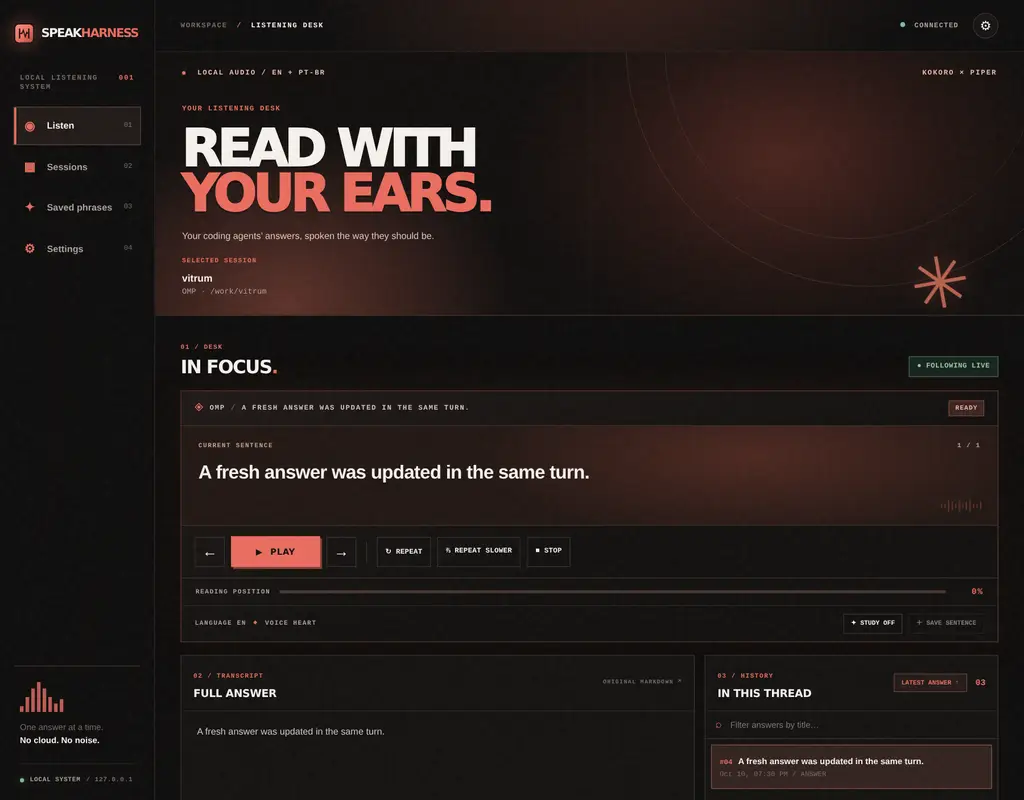
SpeakHarness with a selected OMP session, current spoken sentence, playback controls and answer history Explore the interface

Actual listening UI. Fictional conversation, not personal data.

One answer at a time.
No cloud TTS. No noise.
ALREADY IN YOUR WORKFLOWOh My PiPiCodexClaude Code

20 SECONDS / NO WORDS

Text goes in.
Sound comes out.

Markdown, symbols and code blocks flow from your agent into SpeakHarness and leave as a calm, readable voice.

FROM YOUR AGENT. TO YOUR EARS.

Watch the handoff.
Hear the answer.

A fictional Claude Code reply.
Real SpeakHarness voices. Press play to listen.

CLAUDE CODEEXAMPLE SESSION
Claude Code~/example-project

How should I handle a failed request?

ASSISTANT / FINAL REPLY

## Handle errors clearly

The session is ready.

Keep the validation on the **server**, and show a clear error when the request fails.

You can keep reviewing the code while I read the explanation.

Final answer in the local transcript
SPEAKHARNESSLISTENING DESK
LISTENING SCRIPT EN / HEART · KOKORO
The session is ready. Keep the validation on the server, and show a clear error when the request fails. You can keep reviewing the code while I read the explanation.

A real, pre-generated voice sample. Audio starts only when you press Play.

  1. 01The agent answersA final reply, not tool chatter.
  2. 02SpeakHarness readsLocal transcript → clean speech script.
  3. 03You listenThe text stays in view. Your pace.

Illustrative walkthrough, not a live connection to Claude. Audio was generated locally with SpeakHarness and is served here as a short recording; the website does not run the speech model. Claude Code is an Anthropic product; SpeakHarness is independent.

Open a sample directly: English / Kokoro Heart · Português / Piper Faber. The waveform shows the recording's measured amplitude; the progress follows audio playback, not a simulated timer.

02 / LESS SCROLLING. MORE LISTENING.

Keep your eyes
on the code.

Not another chat window.
A better way to take in the answer.

01 — CONNECT

Pick a session.
Keep working.

Open an existing OMP, Pi, Codex or Claude Code conversation. No copy-paste. No need to restart your agent.

02 — LISTEN

The explanation.
Not the syntax.

Markdown becomes a speech script. Links are read by label; code blocks are announced instead of recited.

03 — REVISIT

A sentence worth
hearing twice.

Pause, replay, repeat slower or save a phrase. Move through the written answer without losing your place.

SpacepauseRrepeat←→
Open the appChoose a sessionPress Play

Want hands-free reading? Enable Read new answers automatically in Settings.

03 / TWO LANGUAGES. ONE CONVERSATION.

English.
Português.
Naturally local.

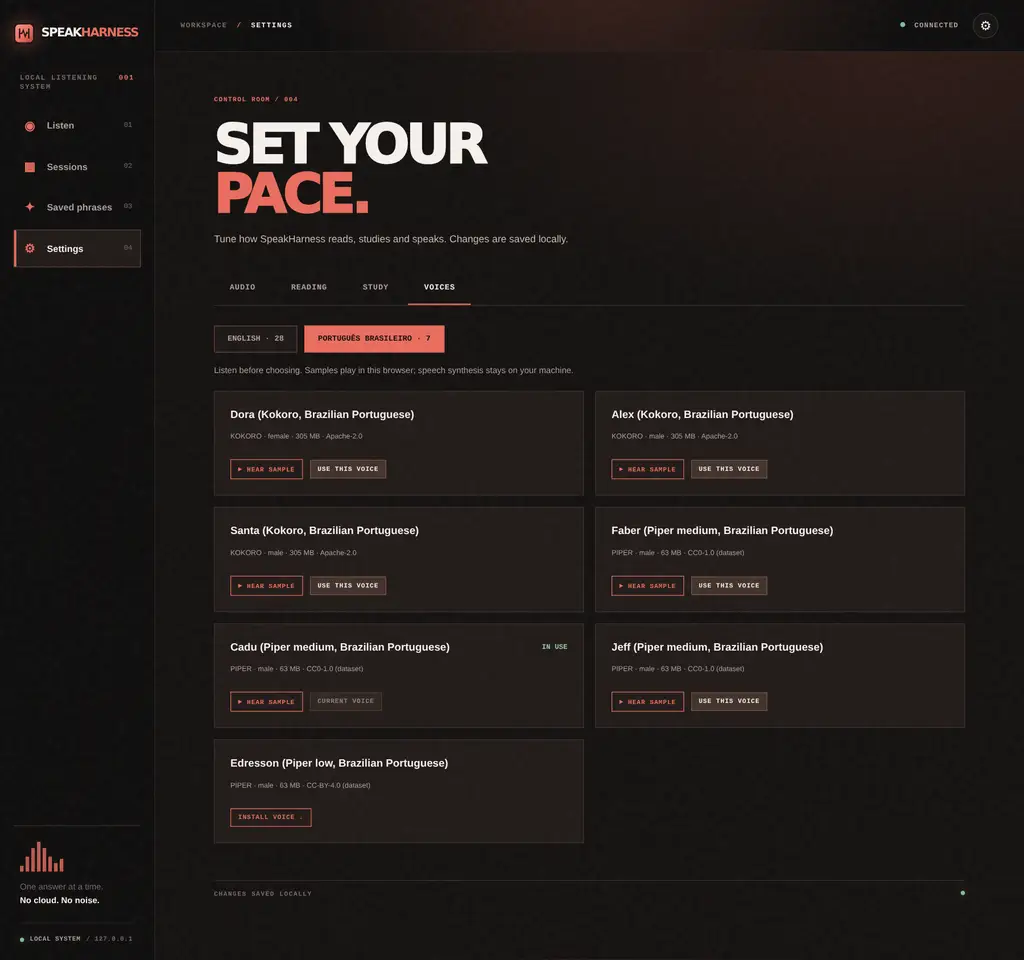
English goes to Kokoro. Brazilian Portuguese goes to Piper. Language detection runs per paragraph, so a bilingual answer doesn't need a manual voice switch.

EN / KOKOROPT-BR / PIPER

The app interface is in English. Speech and language detection run on your computer after the initial model download.

SpeakHarness voice settings showing local Brazilian Portuguese voices and preview buttonsFind your voice

04 / A WIDER LISTENING DESK

Four agents.
One app.

Switch agents, not listening tools.
Here's what the documented coverage looks like.

4/ agents

Follow the sessions
you already have.

SpeakHarness reads existing local transcripts and brings them into one desktop reader, with English/pt-BR narration and sentence-level controls.

Other tools have strengths too: Aloud voices approval alerts; claudio-tts advertises more voice languages. More integrations doesn't mean better at everything.

Read the full comparison
Sources & counting method

Checked October 11, 2026. We count each named coding harness with a documented built-in path for automatic spoken replies after enabling it. Transcript polling, hooks and mod events qualify, but are different mechanisms. OMP and Pi are counted separately. Generic terminal capture and manually invoked MCP tools are not dedicated automatic integrations.

Sources: SpeakHarness adapters, Aloud README, claudio-tts README. This is a comparison with two direct alternatives, not the entire market. We have not run an identical-hardware benchmark and make no latency, reliability or voice-quality ranking.

5native OS/CPU targets
2locally synthesized languages
0hosted TTS accounts required
See the release checks

CI installed the packages, rendered their windows and generated speech. It did not test physical speakers.

05 / GIVE YOUR AGENTS A VOICE

Your next answer.
Out loud.

Get the native desktop app.
Bun, Node.js and synthesis libraries included.

01 / WINDOWS

Windows

x64 · installer

Download .exe

Run the installer, then open SpeakHarness from Start.

Unsigned installer. SmartScreen may warn before opening.

02 / MACOS

macOS

Apple Silicon & Intel

Apple Silicon .dmg Intel Mac .dmg

Drag SpeakHarness into Applications.

Ad-hoc signed, not notarized. Gatekeeper may require approval in Privacy & Security.

03 / LINUX

Linux

glibc desktops · x64 & ARM64

x64 AppImage

Make the AppImage executable, or install the .deb. On NixOS, use appimage-run.

Needs a graphical session and a working PipeWire, PulseAudio, ALSA or ffplay player.

v0.2.0 · Windows ARM64 and Alpine/musl are not packaged.Verify SHA256 checksums

First-run voice downloads: approximately 305 MB for Kokoro q4 + 63 MB for Piper Faber. Cached locally for next time.

06 / GOOD QUESTIONS

Before you
press Play.

Ask on GitHub
Does my code leave my computer?

SpeakHarness reads local session files without writing to them. Speech synthesis and language detection happen locally. Model installation downloads files from upstream hosts; it does not upload conversations. There is no SpeakHarness account or telemetry service. Your coding agent has its own separate privacy policy.

Do I have to restart my coding agent?

No, not for transcript following. Open Sessions in SpeakHarness, choose an existing supported conversation, then press Play. The optional OMP extension requires restarting OMP once after installing it.

Can I speak commands back to the agent?

SpeakHarness is a listening companion, not a dictation app. It reads answers; it does not record your microphone or approve actions for you.

Is the browser required?

No. The desktop app opens its own window and starts the local service. A browser dashboard and terminal reader are optional alternatives, available from source or the Nix CLI package. The Nix flake does not install the Electron app.

What about other agents and languages?

Native transcript adapters cover OMP, Pi, Codex and Claude Code. Other CLI tools can be launched through speakh run -- <command> for terminal capture, with less structured reading. Narration supports English and Brazilian Portuguese; the app interface is English.

Is it open source?

Yes. Original SpeakHarness code is MIT-licensed. The bundled ephone phonemizer is GPL-3.0-or-later, so redistributing the combined package must respect those terms. Voice models have their own licenses. See the third-party notices.

SpeakHarness preview